

Kitchen design software that carries the job to the invoice
OpalSketch is a 3D kitchen designer, a project portal and a client page in one browser app. Draw the room with real cabinet lines, turn the selections into a quote, and let the client approve and sign on a page with your name on it.
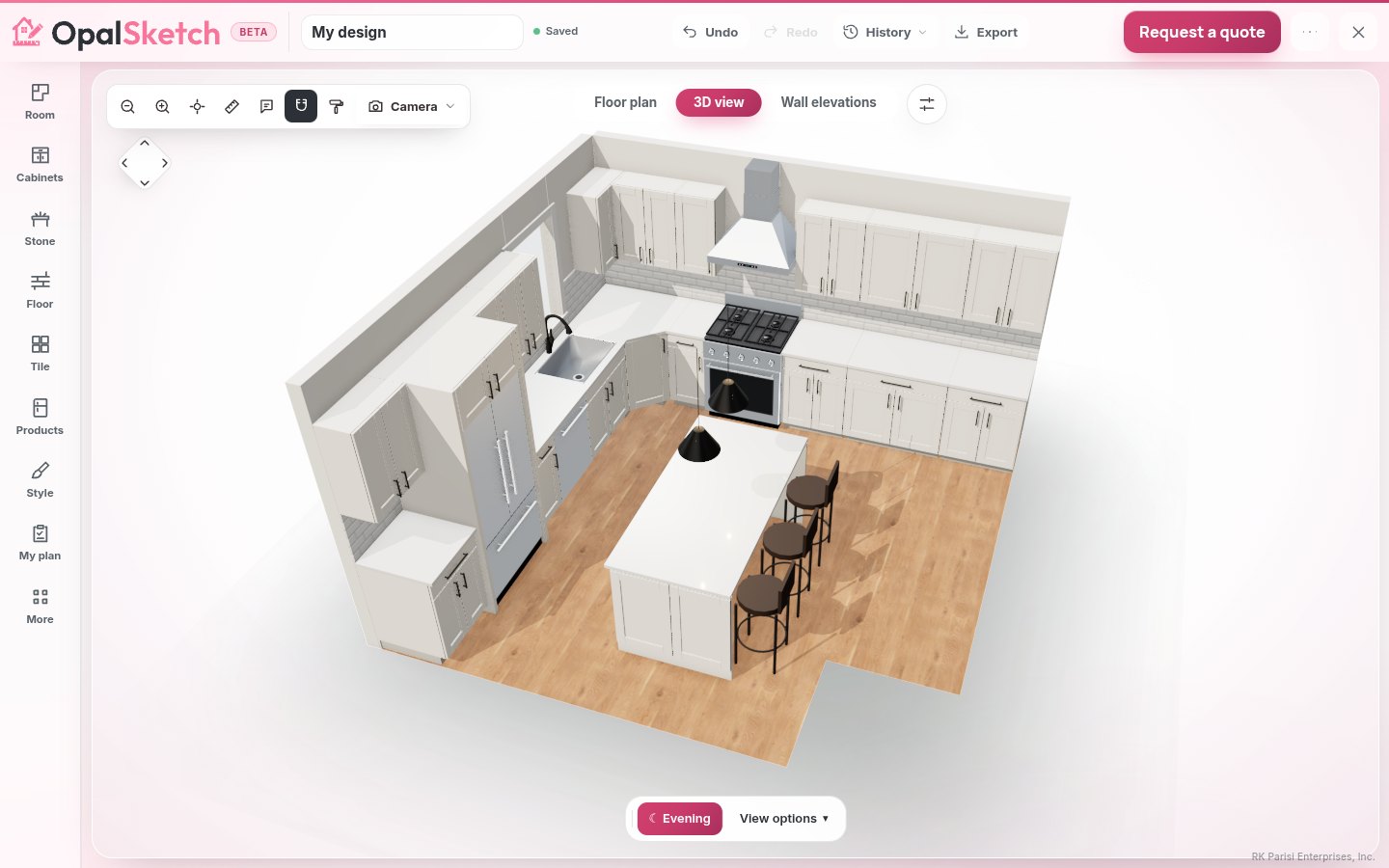
Design with the makers' own sizes
Cabinets come from real manufacturer lines, with the codes, sizes and door colors in the makers' spec books. A size the book does not confirm is never guessed: that piece is listed for your team to quote.
Plan, 3D and elevations
A floor plan to scale, the room in 3D with the walls toward you cut away, and wall elevations with each cabinet's code on a tag. Switch views in one click.
Spec books one click away
Each cabinet maker's spec book opens from the designer, so "does it come in 15 inches?" is answered on the spot.
Presentation and drawing set
A presentation whose cover names the client and your business, and a drawing set with the plan, every elevation, the appliance, door and window schedules, and your notes.
Prices from the drawing
Every cabinet becomes a priced line. Prices stay hidden until you switch them on. The cabinet quote measures toe kick and crown, and the dealer order list counts hinges, slides and pulls.
Versions and notes
Save named versions before you try an idea, compare one with the design as it is now, and go back. Pin numbered notes to the plan.
Exports for your other tools
DXF for CAD programs, a GLB model, a parts list and a dealer order list as CSV, a render set and the plan file. See the cabinet layout tool for the details.
From selection to signed contract
Products, prices and approvals live in one project record, so nothing is typed twice. These parts run in the portal, part of the studio edition.
Products and your catalog
Add a product once with its vendor, SKU, room and price, or import your products from a spreadsheet into My catalog. It flows into quotes, invoices, purchase orders and spec sheets.
Quotes
Make a line-item quote from the project's products in one click, with sales tax from your settings. Mark it sent, and the client approves or declines it on their page.
Contracts and questionnaires
Contract templates fill in the client, the project, the date and the total. Discovery forms the client fills in show as a brief beside the plan.
The client page
One private page per project, with your name and logo. The client walks through each design in 3D (view only), approves selections and quotes, signs and messages you. Every answer is logged. How the client portal works.
Orders and invoices
One purchase order per vendor from approved products, an order tracker from Proposed to Installed, and invoices with payments recorded as they arrive.
Only what you use
Every feature is a module. Switch off what your team does not use in Settings and it disappears from the menus; your data is kept.
Who it is for
Businesses that design, sell and install, and the designers who work with them.
- Kitchen and bath showrooms that design with the customer in the room.
- Cabinet and fixture dealers who want customers to build with their line, then quote it.
- Independent kitchen designers who need concepts, selections, approvals and invoices in one place.
- Cabinet shops and remodelers who want plans, product lists and client updates in the same record.
A project, step by step
Add the client with their email address and any vendors. Everything for the job hangs off this project.
On the Designs tab, + Add design opens the designer. Draw the room, place real cabinets, appliances and fixtures, and check the elevations.
Add the products with prices, vendors and rooms, then Quote from products makes the quote with your sales tax.
Show to client puts a design on the client's page. The client approves, signs and messages you there.
Create POs from approved products, follow each one to Installed, and invoice from the quote.
Compared with paper, spreadsheets and email
The old way
A hand sketch or a separate CAD file, a spreadsheet for pricing, a quote typed again in a word processor, and approvals buried in email. Each copy can drift from the others, and a size that does not exist can reach the order.
With OpalSketch
The drawing, the products, the quote and the approvals share one record. Sizes come from the makers' books. The client sees one page, and every approval, signature and answer is logged on the project with the time.
Questions
Is it ready to use?
The designer and the portal run today in your browser as a preview, and keep your work in that browser, so export backups. Features marked Cloud service on the features page, such as team accounts, need the OpalSketch cloud service, which opens later in the beta.
Do I pay per user?
No. Every paid plan includes unlimited users. Quotes, the client portal and purchase orders are on Studio, at $69 a month per workspace. See pricing.
Will my clients see my brand?
Yes. The client page, the presentation and the drawing set carry your business name and logo.
Can I use my own products and models?
Yes. Import your products from a spreadsheet, and bring in your own 3D models and DXF floor plans. Dimensions you confirm are kept as the authoritative size.
Does it handle bathrooms?
Yes. The room helper lays out powder rooms, hall baths, walk-in showers and primary baths. See the bathroom design planner.
Put your next kitchen in front of the client in 3D
Open the designer and draw a room, or open the portal and load the sample workspace to look around. No sign-up needed to try it.